Overdue Notifications
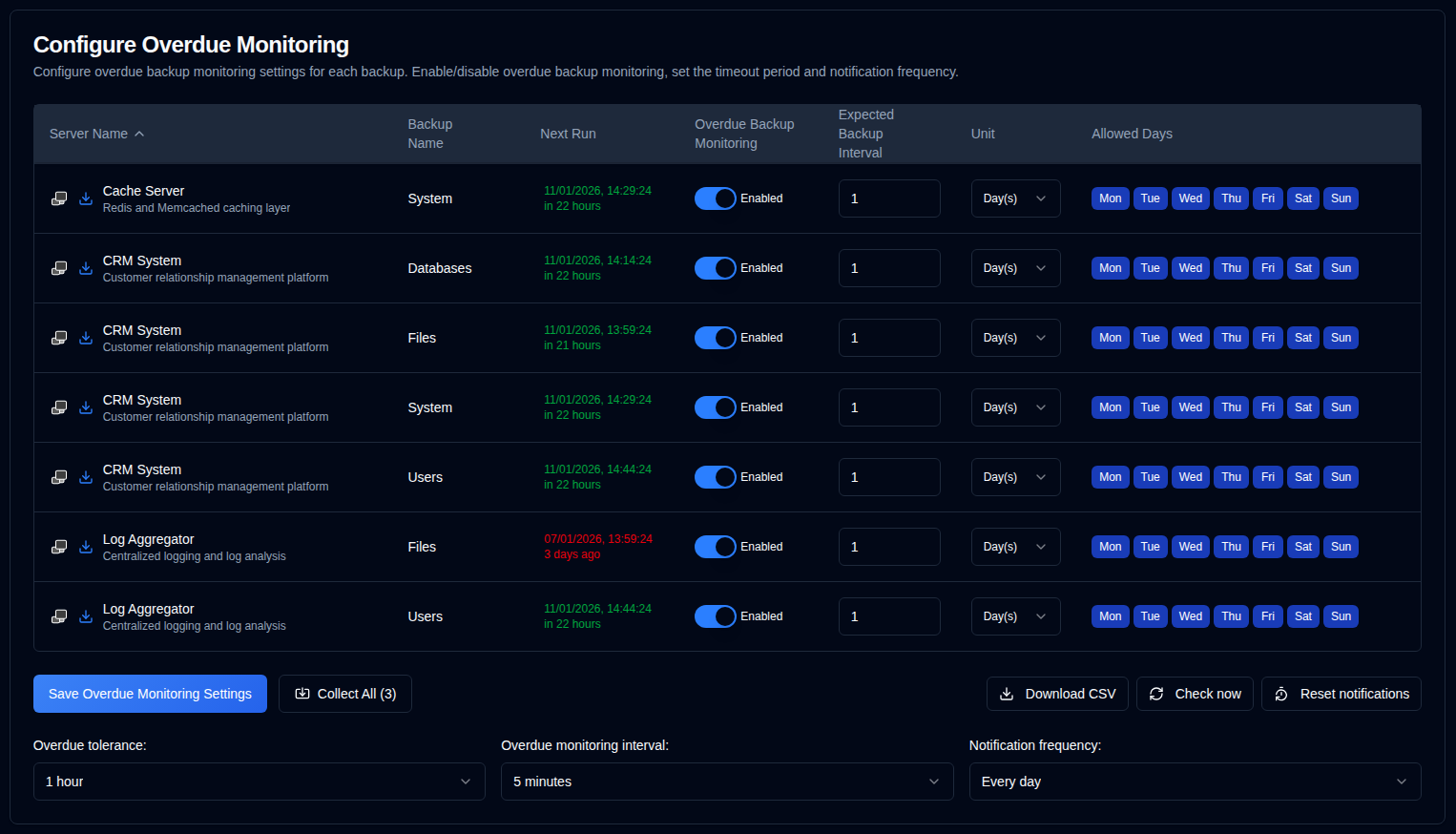
Configure Per-Backup Overdue Settings
- Server Name: The name of the server to monitor for overdue backups.
- Click
 to open the Duplicati server's web interface
 - Click to collect backup logs from this server.
- Click
- Backup Name: The name of the backup to monitor for overdue backups.
- Next Run: The next scheduled backup time displayed in green if scheduled in the future, or in red if overdue. Hovering over the "Next Run" value displays a tooltip showing the last backup timestamp from the database, formatted with full date/time and relative time.
- Overdue Backup Monitoring: Enable or disable overdue monitoring for this backup.
- Expected Backup Interval: The expected backup interval.
- Unit: The unit of the expected interval.
- Allowed Days: The allowed weekdays for the backup.
If the icons on the side of the server name are greyed out, the server is not configured in the Settings → Server Settings.
note
When you collect backup logs from a Duplicati server, duplistatus automatically updates the overdue monitoring intervals and configurations.
tip
For best results, collect backup logs after changing backup job intervals configuration in your Duplicati server. This ensures duplistatus stays synchronised with your current configuration.
Global Configurations
These settings apply to all backups:
| Setting | Description |
|---|---|
| Overdue Tolerance | The grace period (extra time allowed) added to the expected backup time before marking as overdue. The default is 1 hour. |
| Overdue Monitoring Interval | How often the system checks for overdue backups. The default is 5 minutes. |
| Notification Frequency | How often to send overdue notifications: One time: Send just one notification when the backup becomes overdue. Every day: Send daily notifications while overdue (default). Every week: Send weekly notifications while overdue. Every month: Send monthly notifications while overdue. |
Available Actions
| Button | Description |
|---|---|
| Saves the settings, clears timers for any disabled backups, and runs an overdue check. | |
| Collect backup logs from all configured servers, in brackets the number of servers to collect from. | |
| Downloads a CSV file containing all overdue monitoring settings and the "Last Backup Timestamp (DB)" from the database. | |
| Runs the overdue backup check immediately. This is useful after changing configurations. It also triggers a "Next Run" recalculation. | |
| Resets the last overdue notification sent for all backups. |