NTFY
NTFY is an simple notification service that can send push notifications to your phone or desktop. This section allows you to set up your notification server connection and authentication.
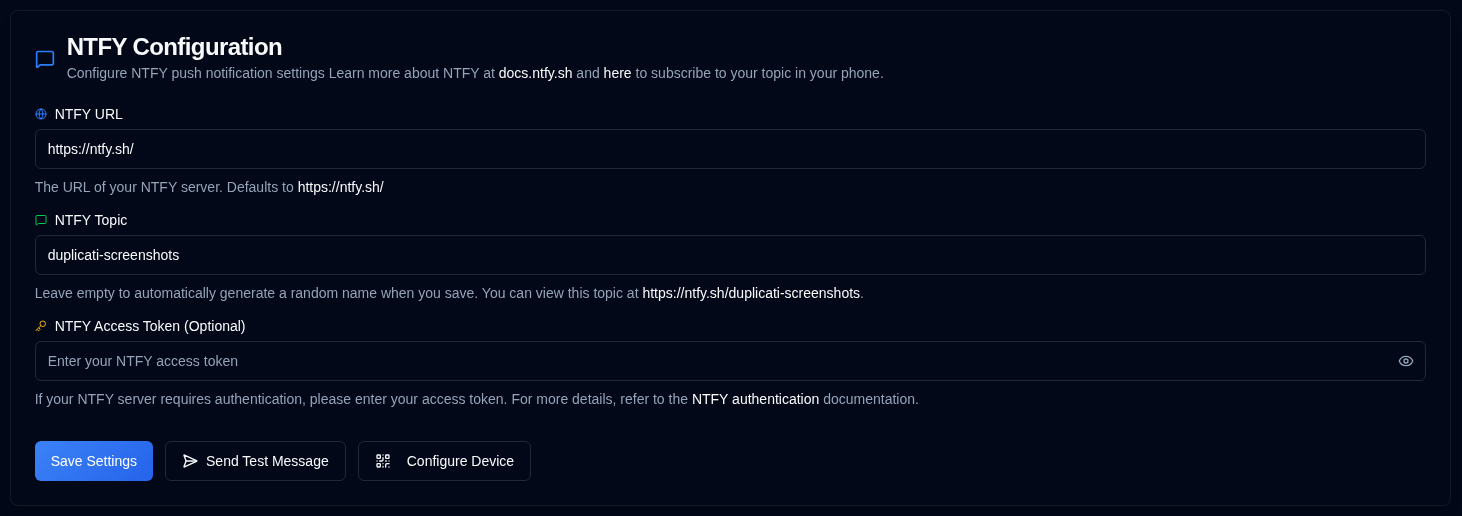
| Setting | Description |
|---|---|
| NTFY URL | The URL of your NTFY server (defaults to the public https://ntfy.sh/). |
| NTFY Topic | A unique identifier for your notifications. The system will automatically generate a random topic if left empty, or you can specify your own. |
| NTFY Access Token | An optional access token for authenticated NTFY servers. Leave this field blank if your server does not require authentication. |
A green icon next to NTFY in the sidebar means your settings are valid. If the icon is yellow, your settings are not valid.
When the configuration is not valid, the NTFY checkboxes in the Backup Notifications tab will also be greyed out.
Available Actions
| Button | Description |
|---|---|
| Save any changes made to the NTFY settings. | |
| Send a test message to your NTFY server to check your configuration. | |
| Display a QR code that allows you to quickly configure your mobile device or desktop for NTFY notifications. |
If a later ntfy delivery fails, administrators see a red siren in the toolbar. See Delivery failures.
Device Configuration
You should install the NTFY application on your device before configuring it (see here). Clicking the button, or right-clicking the icon in the application toolbar, will display a QR code. Scanning this QR code will automatically configure your device with the correct NTFY topic for notifications.
If you use the public ntfy.sh server without an access token, anyone with your topic name can view your notifications.
To provide a degree of privacy, a random 12-character topic is generated, offering over 3 sextillion (3,000,000,000,000,000,000,000) possible combinations, making it difficult to guess.
For improved security, consider using access token authentication and access control lists to protect your topics, or self-host NTFY for total control.
⚠️ You are responsible for securing your NTFY topics. Please use this service at your own discretion.
All product names, logos and trademarks are the property of their respective owners. Icons and names are used for identification purposes only and do not imply endorsement.