Collect Backup Logs
duplistatus can retrieve backup logs directly from Duplicati servers to populate the database or restore missing log data. The application automatically skips any duplicate logs that already exist in the database.
Steps to Collect Backup Logs
Manual Collection
- Click the Collect Backup Logs icon on the Application Toolbar.
-
Select Server
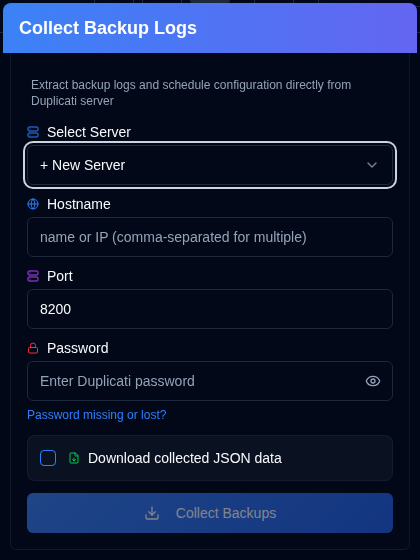
If you have server addresses configured in Settings → Server Settings, select one from the dropdown list for instant collection. If you don't have any servers configured, you can enter the Duplicati server details manually.
-
Enter the Duplicati server details:
- Hostname: The hostname or IP address of the Duplicati server. You can enter multiple hostnames separated by commas, for example
192.168.1.23,someserver.local,192.168.1.89 - Port: The port number used by the Duplicati server (default:
8200). - Password: Enter the authentication password if required.
- Download collected JSON data: Enable this option to download the data collected by duplistatus.
- Hostname: The hostname or IP address of the Duplicati server. You can enter multiple hostnames separated by commas, for example
-
Click Collect Backups.
Notes:
- If you enter multiple hostnames, the collection will be performed using the same port and password for all servers.
- duplistatus will automatically detect the best connection protocol (HTTPS or HTTP). It tries HTTPS first (with proper SSL validation), then HTTPS with self-signed certificates, and finally HTTP as a fallback.
buttons are available in Settings → Backup Monitoring and Settings → Server Settings for single-server collection.
Bulk Collection
Right-click the Collect Backup Logs button in the application toolbar to collect from all configured servers.
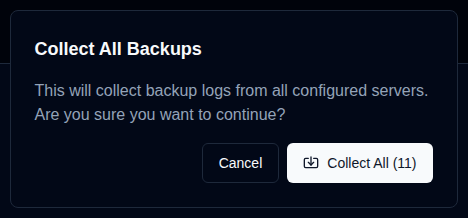
You can also use the button in the Settings → Backup Monitoring and Settings → Server Settings pages to collect from all configured servers.
How the Collection Process Works
- duplistatus automatically detects the best connection protocol and connects to the specified Duplicati server.
- It retrieves backup history, log information, and backup settings (for backup monitoring).
- Any logs already present in the duplistatus database are skipped.
- New data is processed and stored in the local database, including the Duplicati version reported in each backup log. The dashboard version is taken from the latest stored log — duplistatus does not read the version that is currently running on the server. After a Duplicati upgrade, collect or wait for a new backup so the dashboard can show the new version.
- The URL used (with the detected protocol) will be stored or updated in the local database.
- If the download option is selected, it will download the JSON data collected whenever any data is received from the Duplicati server — even if the logs fail validation or cannot be imported into the database. The file name will be in this format:
[serverName]_collected_[Timestamp].json. The timestamp uses the ISO 8601 date format (YYYY-MM-DDTHH:MM:SS). - The dashboard updates to reflect the new information.
If the same server appears more than once after collecting backup logs (or after a Duplicati reinstall/upgrade), it is usually caused by a changed machine_id or by a Duplicati API bug that mixes the identity id and the machine_id. The fix is to align the ids on the Duplicati server (edit identity.txt/machineid.txt or set Duplicati → Settings → Advanced Options → Machine-id), restart Duplicati, then merge the entries in duplistatus via Settings → Database Maintenance → Merge Duplicate Servers. See Duplicate Servers on the Dashboard for full steps.
Troubleshooting Collection Issues
Backup log collection requires the Duplicati server to be accessible from the duplistatus installation. If you encounter issues, please verify the following:
- Confirm that the hostname (or IP address) and port number are correct. You can test this by accessing the Duplicati server UI in your browser (e.g.,
http://hostname:port). - Check that duplistatus can connect to the Duplicati server. A common problem is DNS name resolution (the system cannot find the server by its hostname). See more in troubleshooting section.
- Ensure the password you provided is correct.
- On Duplicati 2.4+, collection reads the machine-id from Duplicati server settings when the systeminfo option default is empty.