Users
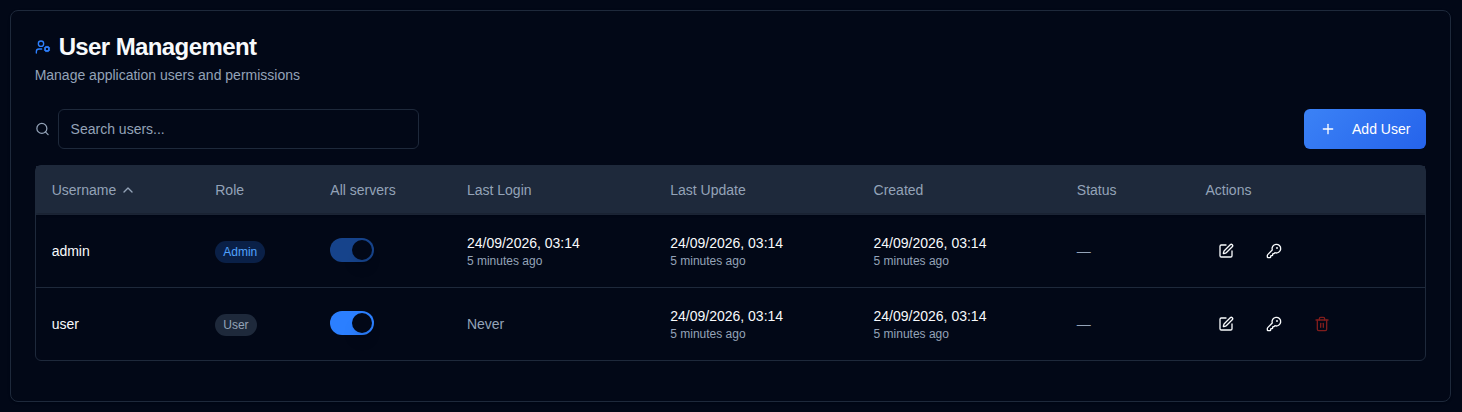
Manage user accounts, permissions, and access control for duplistatus. This section allows administrators to create, modify, and delete user accounts.
Tip
The default admin account can be deleted. To do so, first create a new admin user, log in with that account,
and then delete the admin account.
The default password for the admin account is Duplistatus09. You will be required to change it upon first login.
Accessing User Management
You can access the User Management section in two ways:
-
From the User Menu: Click the in the Application Toolbar and select "Admin Users".
-
From Settings: Click on and Users in the settings sidebar
Creating a New User
- Click the button
- Enter the user details:
- Username: Must be 3-50 characters, unique, case-insensitive
- Admin: Check to grant administrator privileges
- Require Password Change: Check to force password change on first login
- Password:
- Option 1: Check "Auto-generate password" to create a secure temporary password
- Option 2: Uncheck and enter a custom password
- Click .
Editing a User
- Click the edit icon next to the user
- Modify any of the following:
- Username: Change the username (must be unique)
- Admin: Toggle administrator privileges. Turning this on gives access to every server and clears a custom server list. Turning it off starts again at all servers
- Require Password Change: Toggle password change requirement
- Click .
Resetting a User Password
- Click the key icon next to the user
- A suggested password is already filled in and visible. Editing it hides the password; use the view icon to show it again, then copy it
- Require password change on next login is checked by default. Uncheck it if the user should keep this password
- Click Reset password. The password is not shown again
Deleting a User
- Click the delete icon next to the user
- Confirm the deletion in the dialog box. User deletion is permanent and cannot be undone.
Server visibility
Administrators always see every server. In the user list, All servers is a switch. Leave it on for every current and future server. Turn it off to expand a row and choose servers. The header checkbox selects or clears the visible rows. Save shows each selected server as alias (name), with an edit icon to change the list. A new server stays hidden until it is checked. Checking none means the user sees no servers. The dashboard, server detail, backup history, charts, and settings lists then include only those servers. A direct link or API request for another server is treated as not found. External API keys are not limited by this grant.
Account Lockout
Accounts are automatically locked after multiple failed login attempts:
- Lockout Threshold: 5 failed attempts
- Lockout Duration: 15 minutes
- Locked accounts cannot log in until the lockout period expires
Recovering Admin Access
If you've lost your admin password or been locked out of your account, you can recover access using the admin recovery script. See the Admin Account Recovery guide for detailed instructions on recovering administrator access in Docker environments.
If the browser shows Access denied (HTTP 403) before the login form, recover with Locked Out by IP Allowlist instead.