Homepage Integration (Optional)
Homepage is a customisable dashboard application. To integrate duplistatus with Homepage, add a widget to your services.yaml file using the Custom API widget type.
Summary Widget
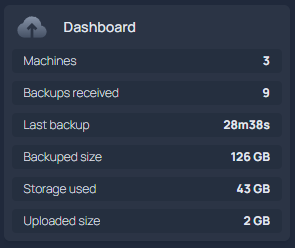
This widget displays overall backup statistics on your Homepage dashboard.
- Dashboard:
    icon: mdi-cloud-upload
    href: http://your-server:9666/
    widget:
      type: customapi
      url: http://your-server:9666/api/summary?api_key=YOUR_READ_KEY
      display: list
      refreshInterval: 60000
      mappings:
        - field: totalServers
          label: Servers
        - field: totalBackups
          label: Backups received
        - field: secondsSinceLastBackup
          label: Last backup
          format: duration
        - field: totalBackupSize
          label: Backed up size
          format: number
          scale: 0.000000001
          suffix: GB
        - field: totalStorageUsed
          label: Storage used
          format: number
          scale: 0.000000001
          suffix: GB
        - field: totalUploadedSize
          label: Uploaded size
          format: number
          scale: 0.000000001
          suffix: GB
Widget Display:
Last Backup Information Widget
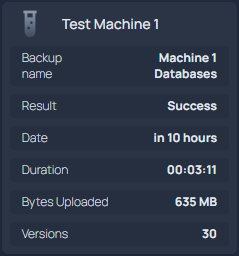
This widget displays the latest backup information for a specific machine.
- Test Machine 1:
    icon: mdi-test-tube
    widget:
      type: customapi
      url: http://your-server:9666/api/lastbackup/Test%20Machine%201?api_key=YOUR_READ_KEY
      display: list
      refreshInterval: 60000
      mappings:
        - field: latest_backup.name
          label: Backup name
        - field: latest_backup.status
          label: Result
        - field: latest_backup.date
          label: Date
          format: relativeDate
        - field: latest_backup.duration
          label: Duration
        - field: latest_backup.uploadedSize
          label: Bytes Uploaded
          format: number
          scale: 0.000001
          suffix: MB
        - field: latest_backup.backup_list_count
          label: Versions
Widget Display:
Configuration Notes
- Replace
your-serverwith your server's IP address or hostname. - Adjust the
refreshIntervalas needed (in milliseconds). - Replace spaces in machine names with
%20in the URL (e.g.,Test Machine 1becomesTest%20Machine%201). - The
scalevalues convert bytes to more readable units (GB, MB). - Use a read-scope API key when API keys are required. Drop
?api_key=when keys are optional. - If the external API IP allowlist is enabled, include the Homepage host.