Templates
duplistatus uses four templates for notification messages. Email bodies are Markdown (headings, lists, links, and tables). NTFY for Success, Warning/Error, and Overdue uses the same Markdown body, sent with Markdown: yes so ntfy clients can render it. Any GFM table omits its header row and sends the body as plain text, because ntfy does not render tables. Daily Summary is email-only.
The page includes a Template Language selector that sets the locale for default templates. Changing the language updates the locale for new defaults, but it does not change the text of existing templates. To apply a new language to your templates, either edit them manually or use Reset this template to default (for the current tab) or Reset all to default (for all templates).
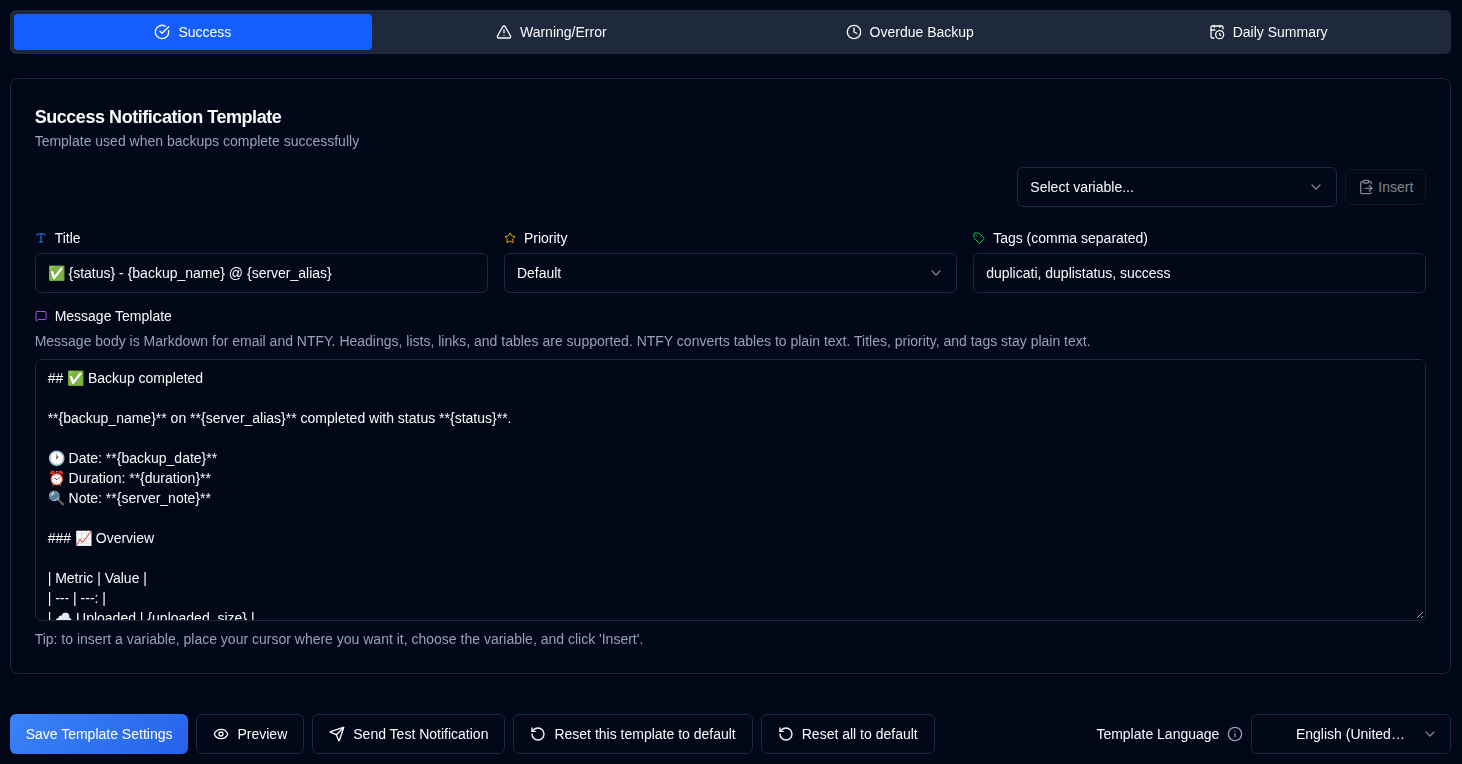
| Template | Description |
|---|---|
| Success | Used when backups complete successfully. |
| Warning/Error | Used when backups complete with warnings or errors. |
| Overdue Backup | Used when backups are overdue. |
| Daily Summary | Markdown email template for the optional daily snapshot. |
Template Language
A Template Language selector at the top of the page lets you choose the language for default templates (English, German, French, Spanish, Portuguese, Hindi, and Simplified Chinese). Changing the language updates the locale for defaults, but existing customized templates keep their current text until you update them or use one of the reset buttons.
Available Actions
| Button | Description |
|---|---|
| Saves the settings when changing the template. The button saves the template being displayed (Success, Warning/Error, Overdue Backup, or Daily Summary). | |
| Checks the template after updating it. The variables will be replaced with their names for the test. For email notifications, the template title becomes the email subject line. Not available on the Daily Summary tab. | |
| Restores the default template for the selected template (the current tab). Remember to save after resetting. | |
| Restores all templates (Success, Warning/Error, Overdue Backup, and Daily Summary) to the defaults for the selected Template Language. Remember to save after resetting. |
Variables
Email bodies are Markdown. Headings, lists, links, and tables are supported. Placeholder values are inserted as escaped text and cannot introduce Markdown or HTML. Previously embedded raw HTML in customized templates is now escaped. NTFY receives the same Markdown, except GFM tables: the header row is omitted and body rows are sent as plain text, for any column layout.
The default Success, Warning/Error, and Overdue bodies use the same Markdown style as Daily Summary: a heading, bold values, and an overview table. Unmodified stored defaults are upgraded on load; customized templates are kept.
All Success, Warning/Error, and Overdue templates support variables that will be replaced with actual values. The following table shows the available variables:
| Variable | Description | Available In |
|---|---|---|
{server_name} | Name of the server. | Success, Warning, Overdue |
{server_alias} | Alias of the server. | Success, Warning, Overdue |
{server_note} | Note for the server. | Success, Warning, Overdue |
{server_url} | URL of the Duplicati Server web configuration | Success, Warning, Overdue |
{backup_name} | Name of the backup. | Success, Warning, Overdue |
{status} | Backup status (Success, Warning, Error, Fatal). | Success, Warning |
{backup_date} | Date and time of the backup. | Success, Warning |
{duration} | Duration of the backup. | Success, Warning |
{uploaded_size} | Amount of data uploaded. | Success, Warning |
{storage_size} | Storage usage information. | Success, Warning |
{available_versions} | Number of available backup versions. | Success, Warning |
{file_count} | Number of files processed. | Success, Warning |
{file_size} | Total size of files backed up. | Success, Warning |
{messages_count} | Number of messages. | Success, Warning |
{warnings_count} | Number of warnings. | Success, Warning |
{errors_count} | Number of errors. | Success, Warning |
{log_text} | Warning and error log lines only (not full Information logs). NTFY uses a short summary and may truncate. | Success, Warning |
{last_backup_date} | Date of the last backup. | Overdue |
{last_elapsed} | Time elapsed since the last backup. | Overdue |
{expected_date} | Expected backup date. | Overdue |
{expected_elapsed} | Time elapsed since the expected date. | Overdue |
{backup_interval} | Interval string (e.g., "1D", "2W", "1M"). | Overdue |
{overdue_tolerance} | Overdue tolerance setting. | Overdue |
Daily Summary templates use a different set of variables for the current-status snapshot:
| Variable | Description |
|---|---|
{summary_date} | Local calendar date of the snapshot |
{generated_at} | Date and time the snapshot was generated |
{time_zone} | Saved IANA timezone |
{server_count} / {job_count} | Servers and known jobs |
{success_count} / {warning_count} / {error_count} / {fatal_count} / {unknown_count} / {no_report_count} | Mutually exclusive status buckets |
{overdue_count} | Overdue jobs (orthogonal to status; can overlap the buckets above) |
{problem_table} / {all_jobs_table} | Generated tables of attention-required and all jobs. Columns: Server, Backup, Overdue, Last status, Last result, Duration, Warnings, Errors, Uploaded. |
{duplistatus_link} | Link to the duplistatus dashboard (omitted when no public URL is configured). Prefer this over hand-built Markdown links. |
{duplistatus_url} | Same URL as plain text (empty when no public URL is configured). |
{latest_uploaded_size} / {latest_source_size} / {latest_storage_size} / {latest_file_count} / {total_warnings} / {total_errors} | Latest-result totals |
The default Daily Summary email subject is:
Daily Backup Summary — {summary_date} — ✅ {success_count} Success, ⚠️ {warning_count} Warning, 🕑 {overdue_count} Overdue, 🛑 {error_count} Error, ❌ {fatal_count} Fatal
Unmodified stored default subjects are upgraded to this format. Customized subjects are left unchanged. {unknown_count} and {no_report_count} stay in the email body, not the default subject.
Use Preview to render the email subject, HTML, and plain text without sending. Success, Warning/Error, and Overdue previews also include the NTFY Markdown payload. The preview opens in a dialog. Email HTML / plain text / NTFY buttons sit above the subject. Email HTML follows the current light or dark theme.