Audit Logs
The audit log provides a comprehensive record of all system changes and user actions in duplistatus. This helps track configuration changes, user activities, and system operations for security and troubleshooting purposes.
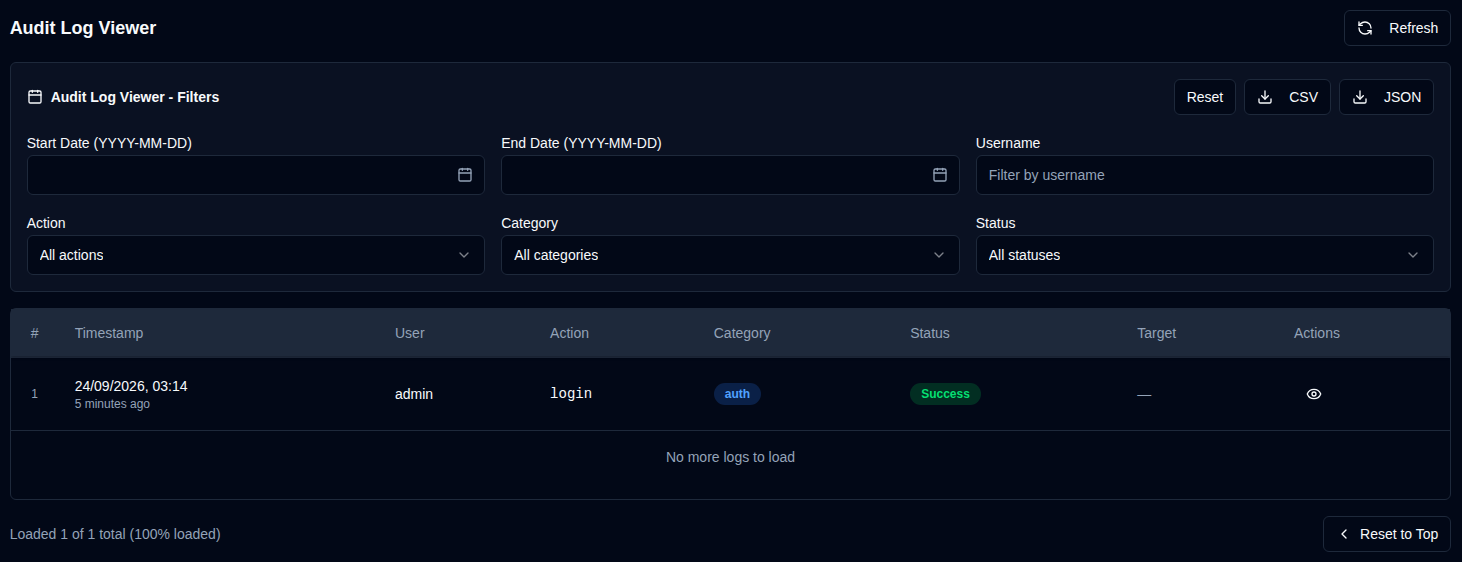
Audit Log Viewer
The audit log viewer displays a chronological list of all logged events with the following information:
- Timestamp: When the event occurred
- User: The username who performed the action (or "System" for automated actions)
- Action: The specific action that was performed
- Category: The category of the action (Authentication, User Management, Configuration, Backup Operations, Server Management, System Operations)
- Status: Whether the action succeeded or failed
- Target: The object that was affected (if applicable)
- Details: Additional information about the action
Viewing Log Details
Click the eye icon next to any log entry to view detailed information, including:
- Full timestamp
- User information
- Complete action details (for example: fields changed, statistics, etc.)
- IP address and user agent
- Error messages (if the action failed)
Exporting Audit Logs
You can export filtered audit logs in two formats:
| Button | Description |
|---|---|
| Export logs as a CSV file for spreadsheet analysis | |
| Export logs as a JSON file for programmatic analysis |
note
Exports include only the logs currently visible based on your active filters. To export all logs, clear all filters first.