Daily Summary
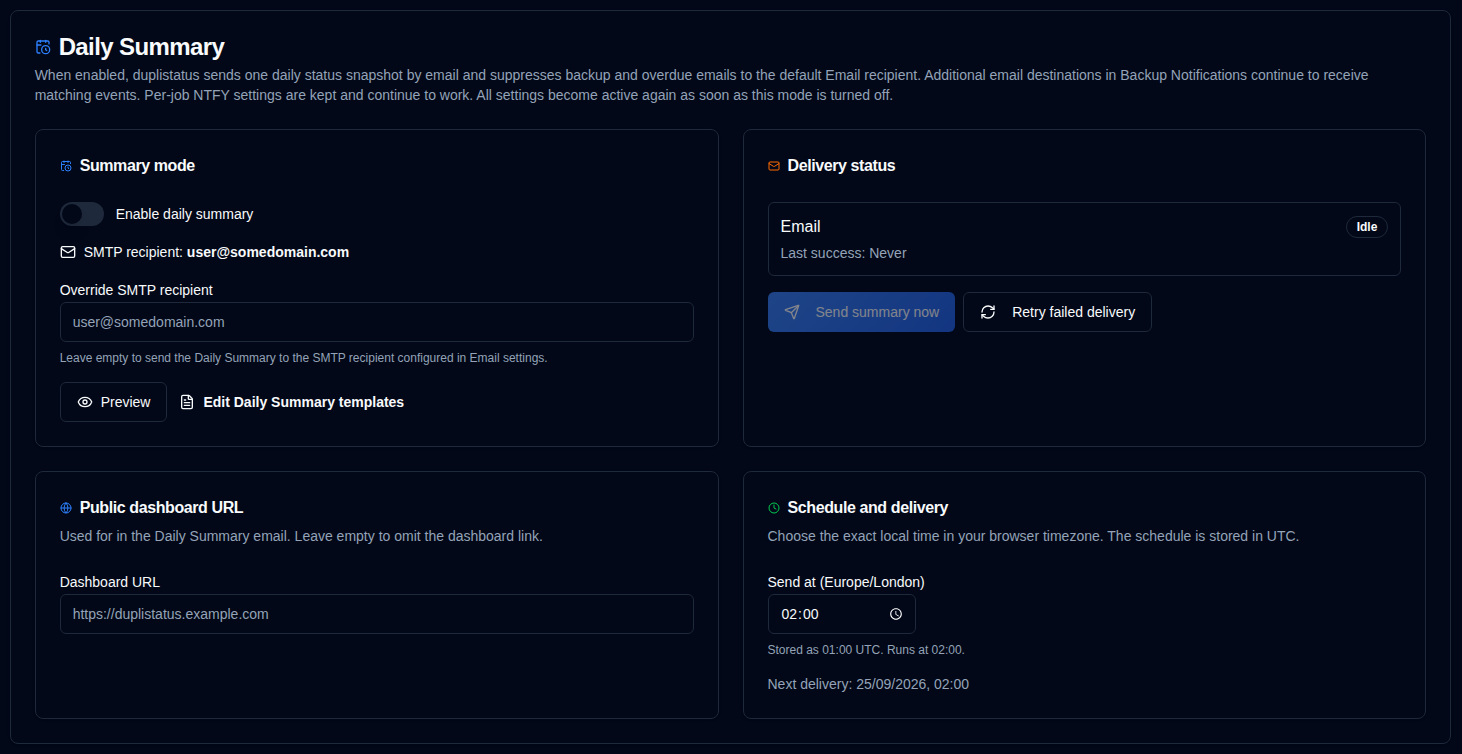
Daily Summary is an optional notification mode that sends one localized snapshot of every known backup job at an exact local time. While it is enabled, backup and overdue emails to the default Email recipient (Settings → Email → Recipient Email) are paused. Additional email destinations configured in Backup Notifications continue to receive matching events. Per-job NTFY notifications continue. Those settings stay stored and become active again as soon as Daily Summary is turned off.
The snapshot is the current status at send time (the latest result for each job). It is not a history of the previous day’s runs.
Requirements
- SMTP must be configured. Email is sent once, to the Override SMTP recipient if one is saved, otherwise to the SMTP recipient from Email settings.
- Check your SMTP configuration and ensure it is working before relying on Daily Summary.
- Scheduled delivery requires the cron service. The dispatcher fires once per day at the stored UTC send time.
What is included
Known jobs are the latest observed backup for each server and backup name — the same set as the dashboard and Settings → Backup Monitoring.
Status buckets (Success, Warning, Error, Fatal, Unknown) are mutually exclusive and add up to the job count. Overdue is counted separately: an overdue successful job is still Success and also overdue.
Schedule
Choose an exact HH:mm time in your browser timezone. duplistatus stores the schedule as UTC and shows both values on the page (same pattern as Duplicati Versions). Changes on this page are saved automatically. The default send time for new installations is 01:00 UTC.
- Enabling or changing the schedule starts at the next future occurrence, never an immediate surprise send.
- The scheduled clock time always sends when the cron job fires. Send summary now, a retry, or an earlier send the same day does not skip it.
Public dashboard URL
Optional Public dashboard URL on this page feeds the {duplistatus_link} placeholder in Daily Summary emails. Use an http:// or https:// URL with no trailing slash. Leave it empty to omit the link.
When DUPLISTATUS_PUBLIC_URL is set in the environment, it overrides the saved setting (see Environment Variables).
Override SMTP recipient
Optional Override SMTP recipient sends the Daily Summary to a different address than the recipient in Email settings. Leave it empty to keep using that default. The value is stored in the daily_summary configuration key (smtpRecipient) and is used for scheduled sends, Send summary now, and retries. The send APIs still do not accept a recipient in the request.
Replacement behaviour
When Daily Summary is on:
- upload and overdue email to the default Email recipient are not sent
- additional email destinations in Backup Notifications still receive matching events (overdue counts as a Warning for that filter)
- per-job NTFY notifications continue
- overdue timestamps are not advanced when nothing was sent, so overdue alerts can resume immediately when the mode is turned off
- template preview, transport tests, and Send summary now still work
Send summary now is an extra delivery. It does not consume the next scheduled occurrence.
Scheduled, Send summary now, and retry deliveries are recorded in the audit log as daily_summary_sent (System Operations). Saving settings is daily_summary_updated (Configuration).
Templates
Edit the Daily Summary email template (Markdown) under Settings → Templates. The default subject includes {summary_date} plus Success, Warning, Overdue, Error, and Fatal counts so the inbox line summarizes the snapshot. Overdue can overlap the status counts. Email bodies for Success, Warning/Error, Overdue, and Daily Summary all use Markdown. The default template includes {duplistatus_link} at the end when a public dashboard URL is configured on this page or via DUPLISTATUS_PUBLIC_URL.
Generate preview on this page opens the same preview dialog as Settings → Templates: email subject plus Email HTML and plain text. Email HTML follows the current light or dark theme.