Duplicati Server Configuration (Required)
In order for this application to work properly, each of your Duplicati servers needs to be configured to send HTTP reports for each backup run to the duplistatus server.
Apply this configuration to each of your Duplicati servers:
- Configure backup result reporting: On the Duplicati configuration page, select
Settingsand, in theDefault Optionssection, include the following options.
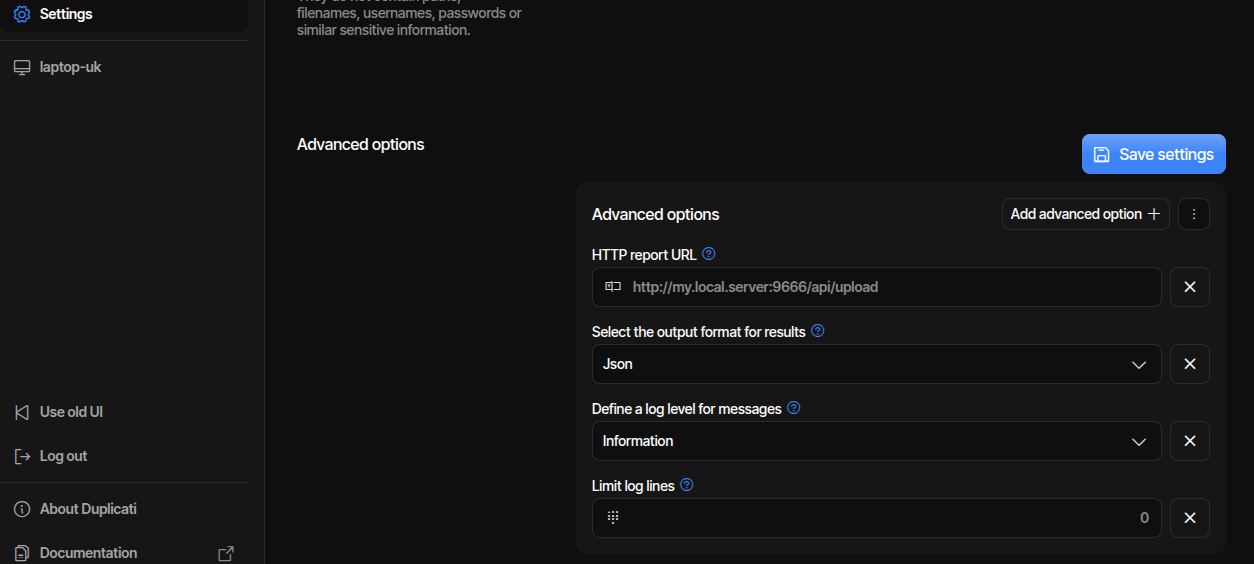
Replace my.local.server with the hostname or IP address that the Duplicati server uses to reach duplistatus. See Duplicati and duplistatus on the same host if both run on one machine.
See Duplicati's HTTP notifications documentation for the option reference.
Recommended options (Duplicati 2.0.9.106 and later)
--send-http-json-urls already sends JSON, so --send-http-result-output-format=Json is not required (and is ignored for these URLs).
| Advanced option | Value |
|---|---|
send-http-json-urls | http://my.local.server:9666/api/upload (add ?api_key= when API keys are required) |
send-http-log-level | Information |
send-http-max-log-lines | 500 |
Alternatively, you can click on Edit as text and copy the lines below, replacing my.local.server with your actual server address.
--send-http-json-urls=http://my.local.server:9666/api/upload
--send-http-log-level=Information
--send-http-max-log-lines=500
When API keys are required, append the upload-scope key to the URL:
--send-http-json-urls=http://my.local.server:9666/api/upload?api_key=YOUR_UPLOAD_KEY
Duplicati cannot set custom HTTP headers. The query parameter is the supported way to send the key. Reverse-proxy access logs will contain the secret, so restrict who can read those logs.
--send-http-max-log-lines=500 keeps the JSON report well under the default 5 MB upload size cap. --send-http-max-log-lines=0 (unlimited) can exceed that cap and return HTTP 413. Increase the limit in Settings → API Keys if you need larger reports.
Older Duplicati versions
If your Duplicati server is older than 2.0.9.106, use the legacy URL option and set the result format to JSON:
| Advanced option | Value |
|---|---|
send-http-url | http://my.local.server:9666/api/upload |
send-http-result-output-format | Json |
send-http-log-level | Information |
send-http-max-log-lines | 500 |
--send-http-url=http://my.local.server:9666/api/upload
--send-http-result-output-format=Json
--send-http-log-level=Information
--send-http-max-log-lines=500
Log lines and available versions
Important notes on messages sent by Duplicati:
- If you omit
--send-http-log-level=Information, no log messages will be sent to duplistatus, only statistics. This will prevent the available versions list from working. - Duplicati's default is
--send-http-max-log-lines=100. The recommended value is500. Duplicati keeps the first N log lines. The lines used for the available versions list (Backups to consider) are usually in those first hundreds of lines;100is often too few. --send-http-max-log-lines=0means unlimited. Use that only if the version list is still missing and you are not also sending reports to Duplicati Monitoring. Unlimited logs can make that service return HTTP 500 on large jobs.- The count of available versions still comes from the JSON statistics (
BackupListCount) even when the detailed timestamp list is missing. If the list icon is greyed out, raise the cap (or use0when reporting only to duplistatus).
After configuring the duplistatus server, collect the backup logs for all your Duplicati servers using Collect Backup Logs.
Reporting to duplistatus and Duplicati Monitoring
You can send reports from the same Duplicati server to duplistatus and Duplicati Monitoring at the same time. duplistatus must receive JSON. Duplicati Monitoring expects form-encoded reports. Do not point --send-http-form-urls at /api/upload.
On that Duplicati server, set Default Options to:
--send-http-json-urls=http://my.local.server:9666/api/upload
--send-http-form-urls=https://www.duplicati-monitoring.com/log/<your-endpoint>
--send-http-log-level=Information
--send-http-max-log-lines=500
Replace <your-endpoint> with the URL from your Duplicati Monitoring account.
- Prefer these dedicated options. Do not also keep
--send-http-urlpointing at the same destinations unless you still need the legacy option. --send-http-log-leveland--send-http-max-log-linesapply to every HTTP target. You cannot send a full log to duplistatus and a short report to Duplicati Monitoring.- Use
500, not0. If Duplicati Monitoring still returns HTTP 500 on large jobs, lower the cap further (or omitInformation) knowing the version list may be missing. If the list is missing but Monitoring is fine, raise the cap. Alternatively, report only to duplistatus for those jobs.
If one HTTP target fails (outage or HTTP 500), Duplicati may not send the remaining reports. Form URLs are sent first, then JSON URLs. An outage or 500 from Duplicati Monitoring can therefore block the JSON report to duplistatus.
Collect Backup Logs does not depend on HTTP reporting. Use it to backfill a run that was not received.
Duplicati and duplistatus on the same host
The upload URL must be reachable from the Duplicati process, not from your browser.
- Duplicati on the host, duplistatus in Docker with port
9666published:http://127.0.0.1:9666/api/upload(or the host LAN IP). - Both in Docker on a shared network:
http://duplistatus:9666/api/upload(the Compose service or container name).localhostinside the Duplicati container is that container, not duplistatus. - HTTPS reverse proxy on the same host: use the public HTTPS URL as in Security Configuration.
Collect Backup Logs is the reverse direction: from the duplistatus container, localhost:8200 is not Duplicati on the host. Use the host IP, host.docker.internal (Docker Desktop, or an extra host you configured), or the Duplicati container name.
- Optional - Allow remote UI access: If you want to access the Duplicati web interface directly from the duplistatus dashboard links, log in to Duplicati's UI, select
Settings, and allow remote access, including a list of hostnames (or use*). If you skip this, duplistatus will still receive backup reports, but the direct links to the Duplicati UI will not work.
If you don't enable remote access in Duplicati, the links in Duplistatus to access the Duplicati UI will not work.
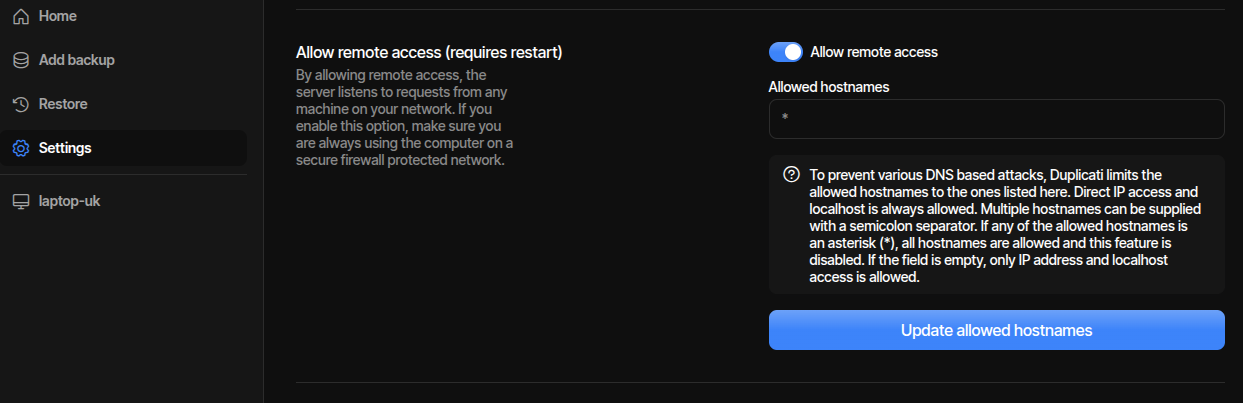
Only enable remote access if your Duplicati server is protected by a secure network (e.g., VPN, private LAN, or firewall rules). Exposing the Duplicati interface to the public Internet without proper security measures could lead to unauthorised access.
Recommended to use Tailscale, Headscale, NetBird, ZeroTier, Nebula, Twingate, Pritunl, Cloudflare Access, Wireguard or similar solutions to securely access your servers from outside your local network.